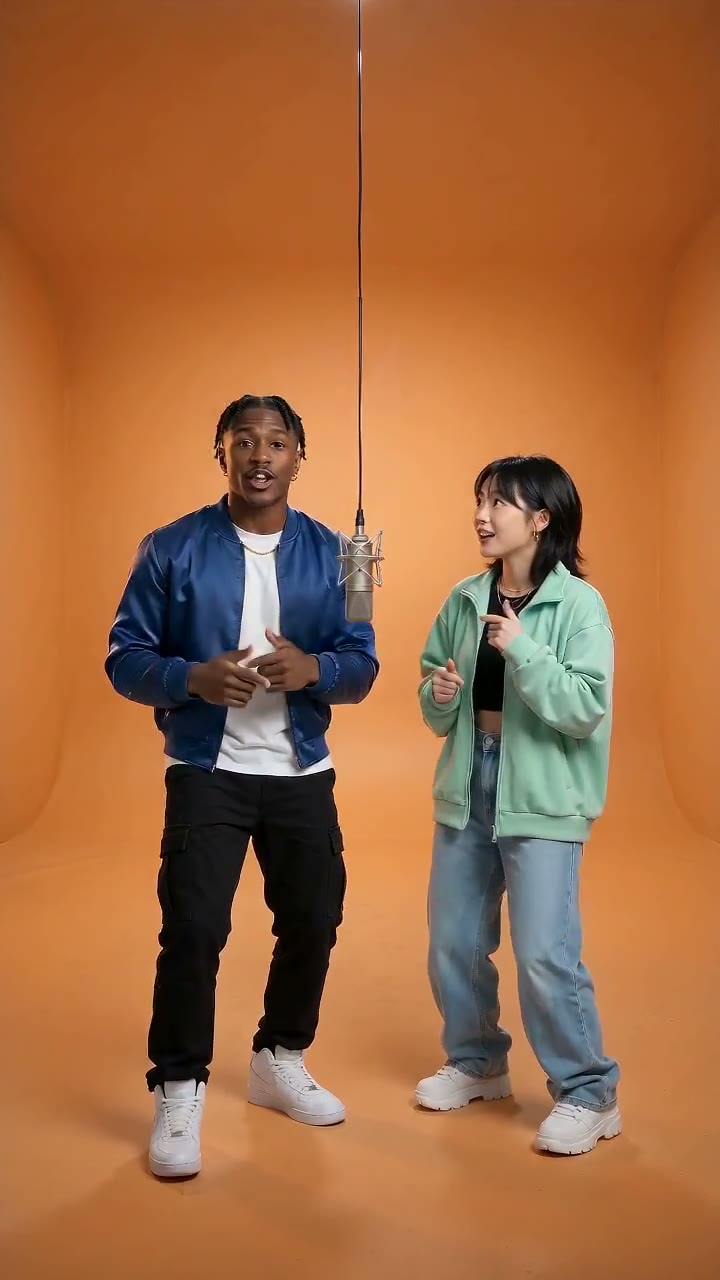
A hotel lobby AI video is two people trading verses in front of a bright orange booth, with one mic hanging between them. You've probably scrolled past a few. This hotel lobby AI video generator makes your own version: add a photo of you and one of a friend, and you get a 15-second video of the two of you on that stage, using our AI rap video generator. The sample playing above shows what comes out.
What a hotel lobby AI video looks like
The look is simple, and that's why it works. There's one strong color, one prop and two people, so nothing competes with the performance.
| Part of the video | On this stage |
|---|---|
| Backdrop | An orange booth that fills the frame |
| Mic | One hanging mic, shared between you |
| Framing | Both of you head to toe, in one continuous shot |
| Sound | An original boom bap beat, written fresh for each video |
| Performance | You trade verses and hype each other up, and only the one rapping moves their mouth |
| Bars | The booth, the hunger and nailing the first take |
| Format | 15 seconds, vertical 9:16, 768P, no subtitles or watermark |
How to make a hotel lobby AI video
The stage is already selected on this page, so there are only three things left to do:
- Add two photosHit the button at the top of the page, then add one photo of you and one of your friend. The first is the rapper on the left, the second on the right.
- Make itSign in with Google, tick the consent box and start the video. It uses 10 credits and is usually ready in a few minutes.
- Post itSave the MP4, copy the caption and share it. Or send it to your friend as a surprise gift link.
Our full guide on how to make AI rap videos goes deeper on the steps and on fixing a take that looks off.
Best photos and outfits for a hotel lobby AI video
Your clothes carry over from your photos, so this stage rewards a bit of thought before you upload. The orange booth is the loudest thing in the frame, and that shapes what looks good against it.
- Stay away from orange and rust. They melt into the booth. Blue, green, white and black all stand out against it.
- Don't match your friend. Two clearly different outfits keep your looks from blending. The sample above pairs a deep blue with a pale mint for that reason.
- Use a full-length photo. You're on screen head to toe here, so a full-body shot keeps your shoes and your whole fit. A waist-up photo works too, but the AI has to invent the rest.
- Face the camera in good light. Both eyes visible, with no sunglasses, masks or heavy filters. Similar light in both photos helps you look like you're in the same room.
Why the hotel lobby AI trend works on the feed
Most of a short video's job happens in its first second, and this format gets a lot done in that second. A flat wall of orange stands out in a feed full of busy shots. Two people sharing one mic tells you straight away that it's a back-and-forth, so you stay to see who goes next.
It's also easy to cast. The setting never changes, so the only new thing in each video is who's in it. That's what makes it fun to send around: a couple, two coworkers or a pair of siblings who'd never go near a booth in real life become the whole joke. And since you don't need the booth, a camera or any rhythm, anyone can try it.
Want a different mood? The Marble Lobby stage swaps the orange for a grand hotel lobby at night, with a crystal chandelier and polished marble over a luxury trap beat. You can switch between stages at the top of this page before you make anything.
Hotel lobby AI video vs filming your own
You can shoot this look for real, and if you already have the space and the skills, that may be the better project. For most people, the gap is in everything that happens before the first take.
| What it takes | Filming it yourself | With RapToVideo |
|---|---|---|
| The set | Find or build an orange booth | Already built into the stage |
| The mic | Hang a real mic and light it | Already in the shot |
| The people | Both of you in one place, at the same time | One photo of each of you, from anywhere |
| The performance | Write bars, learn them, do several takes | The AI writes and performs the bars |
| The edit | Sync the audio and cut it together | One continuous shot, nothing to edit |
| The catch | Takes time, but every word is yours | You can't choose the words, and results vary between takes |
That last row matters. If you've written a verse you want to perform, film it yourself. If you want a funny, good-looking clip of you and a friend by tonight, this is the quick way there.
Who to put in your hotel lobby AI video
The setting stays the same in every video, so your casting is what makes yours different. A few pairings that suit the format, as long as both people are adults who said yes:
- The couple. An easy anniversary surprise, especially with surprise mode and a gift link.
- The long-distance friends. You only need one photo of each of you, so it doesn't matter where you both live.
- The unlikely duo. A pair of siblings, or a parent and their grown-up kid. The less they look like rappers, the better it plays.
- The coworkers. A farewell or birthday video for the group chat, with the other person's agreement first.
Keep it friendly. Videos made to bully or mislead someone break our acceptable use policy, even between friends.
Hotel lobby AI video generator: FAQ
How are people making the hotel lobby AI video?
With an AI video tool that takes a photo of each person and puts them in the orange booth. Here, you add two photos, tick the consent box and make it. The scene, the moves and the camera are already built in, so there's no prompt to write.
Is this hotel lobby AI video generator free?
No. One video uses 10 credits: $8.9 on its own, or as low as $3.3 in a pack. Payment is one-time with no subscription, and credits never expire. There's no free trial, but you can watch the sample above first.
Can I make a hotel lobby AI video on my own?
Each video needs two photos, one per rapper, because the format is two people trading verses. Bring a friend, a partner or a sibling who said yes.
Can I pick the song or write the lyrics?
Not yet. Every video gets an original boom bap beat, and the AI writes fresh bars about the booth, the hunger and nailing the first take. You won't get the same words twice.
Can I use a celebrity or a famous rapper's photo?
No. Photos of public figures and of anyone under 18 are refused. Both people must be adults who agreed to be in the video.
Is this the original Hotel Lobby song?
No. RapToVideo is an independent tool and isn't affiliated with any artist, label or platform. It makes an original video of you two in a similar setting, with its own beat and bars.
How do I post it on TikTok?
Download the MP4, copy the ready-made caption and upload it. The video is vertical 9:16 with no subtitles or watermark. Label it as AI-generated when you post.